
Getting started
Create your company account
Sign up in under a minute. Your company gets its own private space, and you become its owner.
Kipuu is built for teams. When you create an account, Kipuu also creates your company's private space. Everything your team uploads lives there, separate from every other company.
How to sign up
- Open Kipuu and choose Get started.
- Enter your name, your company's name and your work email.
- Choose a password of at least 10 characters. Use the eye icon to check what you typed.
- Select Create account. You land on your company's files right away.
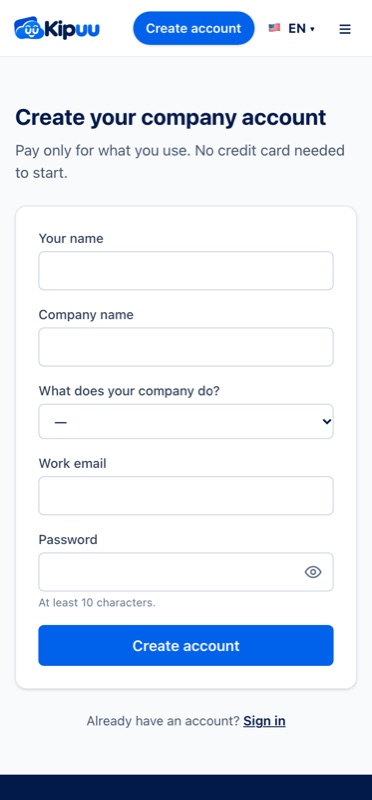
If you close the window halfway, Kipuu remembers what you typed (except your password) and offers to restore it when you come back.
Signing in and out
Sign in with your email and password. To sign out, open Account at the top of the screen and choose Sign out. Signing out ends your session on our side too, so nobody can reuse it on a shared computer.
If you forget your password
- On the sign-in screen, choose Forgot your password?
- Enter your work email. Kipuu sends a link from no-reply@kipuu.com.
- Open the link within one hour and choose a new password. The link works only once.
When you change your password, Kipuu signs out every device where your account was open, for your security.