
Billing and security
Redeem an activation code
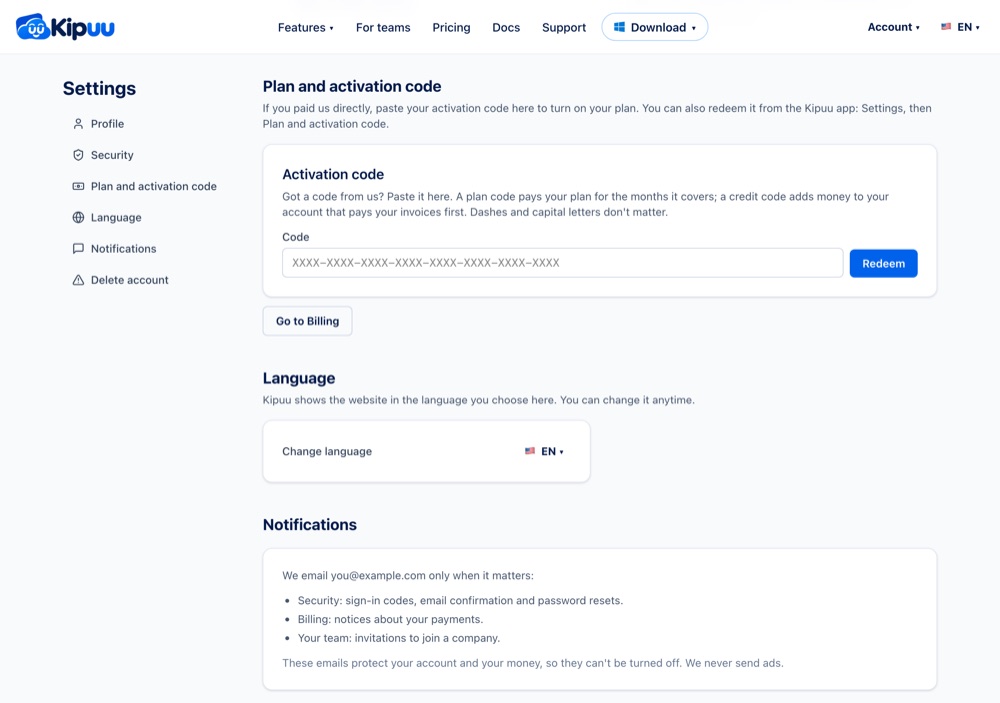
If you paid our team directly, you received an activation code. A plan code pays your plan for the months it covers; a credit code adds money to your account that pays your invoices first. Redeem it in Settings, on the web or in the app.
- Sign in as an owner or administrator. On the web, open your account menu at the top right and choose Redeem activation code (it opens Settings, Plan and activation code). In the phone app, open the Account tab, tap the gear and go to Plan and activation code.
- Under Activation code, type or paste your code. Dashes, spaces and lowercase letters don't matter.
- Select Redeem. You'll see in green what the code gave you: your plan and the month it's paid through, or the amount added to your account credit.
There are two kinds of codes. A plan code pays a plan (Starter, Team or Business) for a number of months, with the people and extra space it includes. A credit code adds a dollar amount to your account: it pays your invoices first, so it works for pay-as-you-go usage or to top up your account. Each code works only once.
While a plan code is active, your plan and its extra space aren't charged and you don't need a card to keep uploading. If you redeem it after the 20th, the rest of that month is on us and your months start the next month. A new plan code for the same plan adds its months after the ones you already have. Your account summary shows the active code and your account credit.
People beyond the ones your code covers are billed monthly, and your account credit pays for them first. If the code doesn't work, write to Support and we'll help you.