
Files and folders
How Kipuu backup works
Kipuu keeps a copy of your photos and videos in the cloud. If you delete them from your phone to free up space, they stay in Kipuu until you delete them there.
A copy that adds up, not a mirror
Some services mirror your phone: when you delete a photo on the phone, it disappears from the cloud too. Kipuu works the other way. It's cloud storage for your company, and camera uploads only add to it. Nothing you do on the phone deletes anything in Kipuu.
That's what lets you use Kipuu to free up space on your phone: once your photos are backed up, you can delete them from the phone and keep working with them from Kipuu on any device.
What happens when you delete a photo
| What you do | In Kipuu | On your phone |
|---|---|---|
| Take a photo | It's uploaded (on Wi-Fi if you chose Only on Wi-Fi) | Nothing changes |
| Delete it from the phone | It stays in Kipuu | It goes to your phone's Recently Deleted |
| Delete it in Kipuu | It goes to the trash for 30 days | Nothing changes, and it isn't uploaded again |
| Restore it from the Kipuu trash | It's back in its folder | Nothing changes |
Deleting in Kipuu never touches your phone, and deleting on your phone never touches Kipuu. Each side is yours to manage.
The 30-day trash
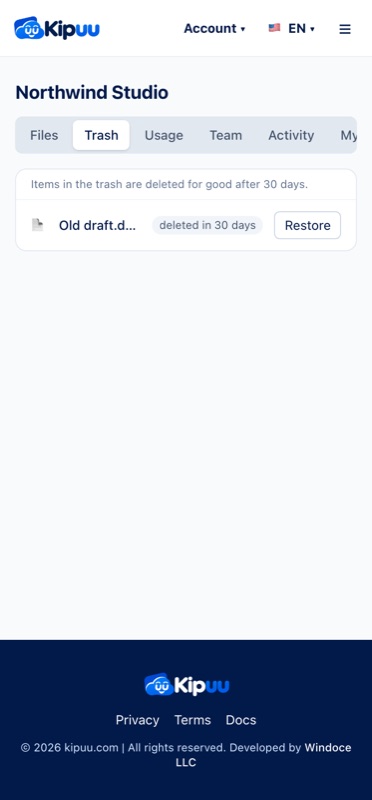
Anything you delete in Kipuu goes to the trash first. It stays there for 30 days, so you can bring it back if you change your mind. After 30 days it's deleted for good.
Files in the trash still count toward your space until they're deleted for good. If you need the space now, open Trash in Kipuu on the web and choose Empty trash. That deletes everything in the trash right away, and it can't be undone.
Kipuu can hold more than your phone
Your space in Kipuu doesn't depend on the size of your phone. It depends on your plan. Say you have a 256 GB phone and a 5 TB plan: you fill the phone, it backs up to Kipuu, you delete from the phone to make room, and you start again. Each round only uploads what's new, and you can keep going until your plan is full.
A photo that's already in Kipuu isn't uploaded twice, even if you restore it on your phone. A photo that comes back as a new file, for example one you download again or one someone forwards to you, is a new file for your phone, so Kipuu backs it up again.
How Kipuu compares
This is how other well-known services handle the camera roll, according to their own help pages in November 2026. They change often, so check each service for its current rules.
| Service | If you delete a photo on the phone | Days to recover | Can hold more than your phone? |
|---|---|---|---|
| Kipuu | It stays in Kipuu | 30 | Yes, up to your plan |
| iCloud Photos | It's deleted on all your devices | 30 | Only with Optimize Storage |
| Google Photos | Deleting in the Google Photos app deletes it everywhere | 30 | Yes, with Free up space |
| OneDrive | It stays in OneDrive | 30 personal, 93 work or school | Yes, up to your plan |
| IDrive | It stays in your account | 30 | Yes, up to your plan |
Backing up with Kipuu in the background
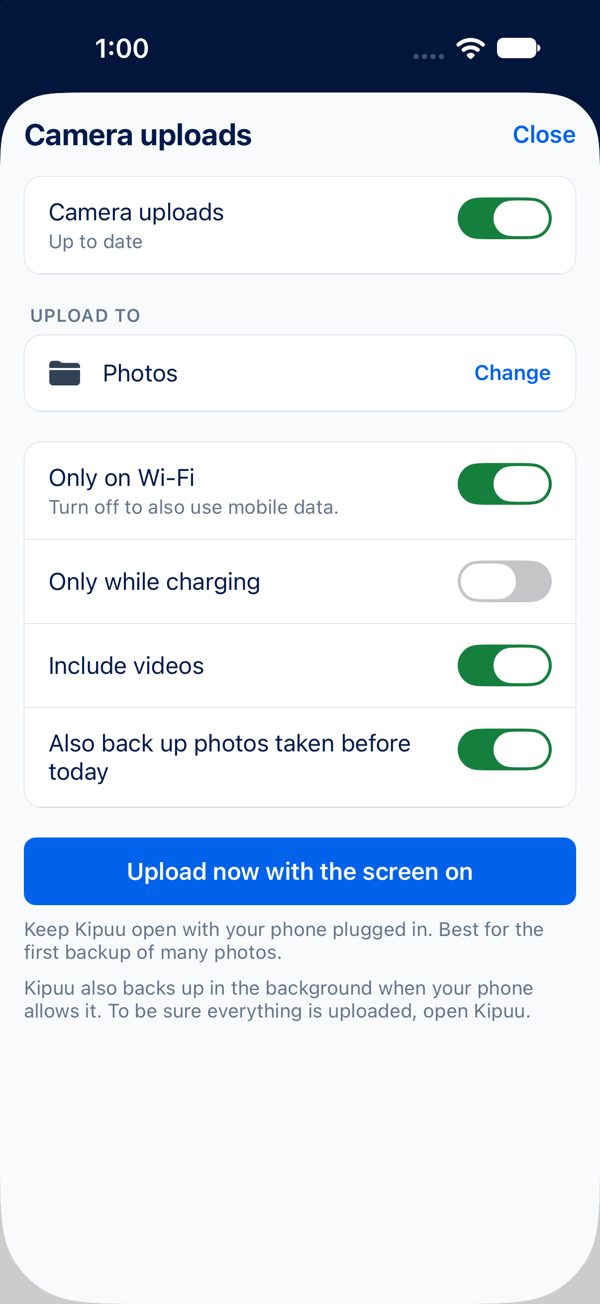
On iPhone, the backup keeps going after you switch to another app. Your iPhone sends photos to Kipuu in batches when it has a good moment, so after a while in the background you'll see the count go up. It goes fastest with Kipuu open, on Wi-Fi and charging. On Android, Kipuu shows a small notification while it's backing up, so it keeps going with the app minimized.
Only on Wi-Fi
With Only on Wi-Fi turned on, the backup pauses when you're on mobile data and picks up on its own as soon as you're back on Wi-Fi. Nothing is lost and nothing starts over.
Frequently asked questions
If I delete a photo from my phone, is it deleted from Kipuu?
No. It stays in Kipuu until you delete it in Kipuu.
If I delete a photo in Kipuu, is it deleted from my phone?
No. Kipuu never deletes anything on your phone. In Kipuu, the photo goes to the trash for 30 days.
Can I get back something I deleted in Kipuu?
Yes, for 30 days. Open Trash, choose the file and restore it. After you empty the trash, it can't be recovered.
Does the trash use my space?
Yes, until files are deleted for good after 30 days, or until you choose Empty trash in Kipuu on the web.
Will Kipuu upload my whole camera roll again if I sign out and back in?
No. Kipuu recognizes the photos that are already backed up and only uploads what's new.
Does the backup work if I close the app?
If you switch to another app, yes. If you force-close Kipuu, the backup stops until you open it again.